A hot-water heat pump without Wi-Fi? How to control it from your phone with a contactor and a Shelly
A hot-water heat pump without Wi-Fi? How to control it from your phone with a contactor and a Shelly
We came across this recently in a house in the Alt Empordà. Heating and cooling ran through ducts, with Kosner units, and the indoor units had Wi-Fi modules: from a phone you could switch the air conditioning on, change the temperature and set schedules. But the domestic hot water (DHW) heat pump was a different story: it did not accept any Wi-Fi module. To switch it on or off, someone had to walk over to the unit.
We solved it with a small box containing a contactor and a Shelly. Here is what it looks like, what you gain, what it doesn’t do and when an electrician needs to be involved.
The idea: leave the heat pump alone and control its power supply
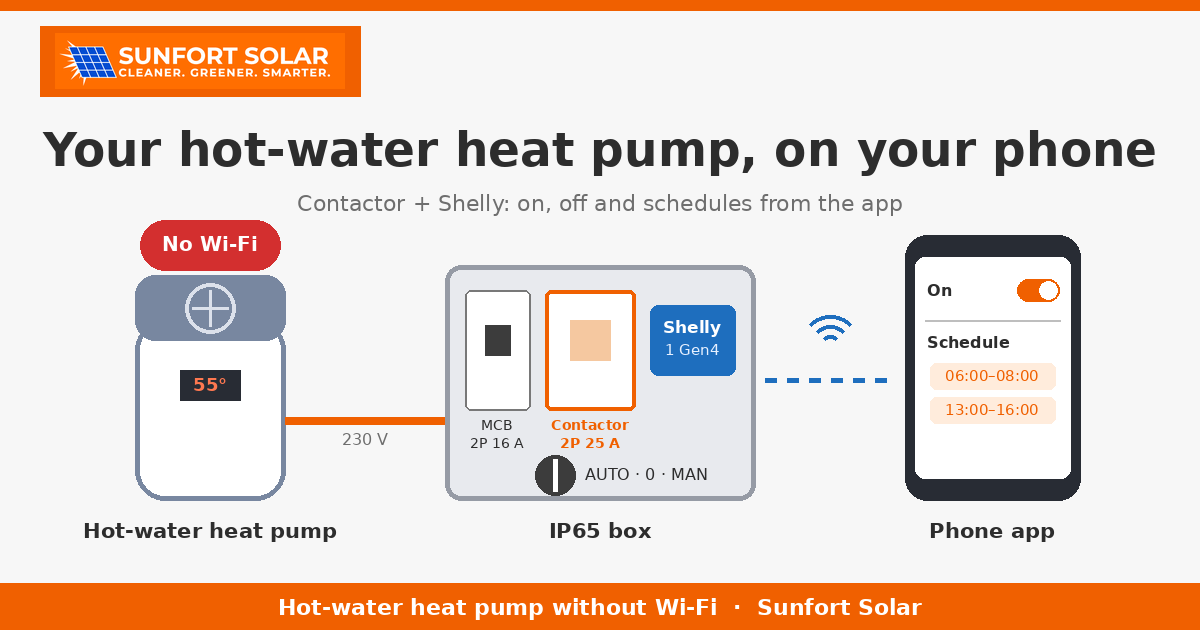
If the unit cannot be connected to the internet, what we can control is the power that reaches it. Between the house’s consumer unit and the heat pump we add a small box that acts as a “smart switch”. When the app says “on”, the heat pump gets power and runs on its own settings. When the app says “off”, it has no power.
The box we fitted holds four parts, inside a weatherproof IP65 enclosure:
- A 2-pole 16 A MCB (circuit breaker), which protects the line.
- A 2-pole 25 A contactor, which is what actually switches the heat pump’s power on and off.
- A Shelly 1 Gen4, a small Wi-Fi relay controlled from an app. In this case, the version without power metering.
- A three-position selector switch: auto, 0 and manual.
Why a contactor, and not the Shelly on its own
The Shelly has a small relay. It might seem enough to run the heat pump’s current straight through the Shelly, but we don’t recommend it:
- A DHW heat pump has a compressor, and often a backup electric heating element too. When the compressor starts it draws a current peak, and the heating element, when it runs, draws power continuously for hours. A small relay can suffer under that kind of use.
- A contactor is made precisely for this: switching power loads many times over many years. If it wears out one day, it is replaced without touching anything else.
- That way, the Shelly only drives the contactor’s coil, which draws very little. The Shelly has an easy life and the load current never goes through it.
That is also why we chose the Shelly without metering: since only the coil current goes through the Shelly, its reading would tell us nothing about the heat pump’s consumption. If you want to know how much it uses, you need a separate meter on the line.
The selector: auto, 0 and manual
- Auto: the Shelly is in charge, meaning the app and the schedules.
- 0: the heat pump stays off, whatever the app says. Useful for maintenance.
- Manual: the heat pump always gets power, bypassing the Shelly. If the Wi-Fi or the Shelly ever fails, just turn the selector and you have hot water as before.
What you gain
- Switch it on and off from your phone, wherever you are, without going to the unit.
- Schedules. You can let the heat pump run only at certain times, for example when electricity is cheapest.
- Use the sun, if you have solar panels. A heat pump is one of the easiest loads to move into sunny hours. A midday schedule already captures a good part of it, and if you have a surplus meter or your inverter’s platform allows it, it can be set to start when there is spare energy.
- Turn it off when the house is empty. In a second home or a holiday let, there is no need to keep the tank hot for weeks with nobody there. Switch it on from your phone the day before you arrive.
What it doesn’t do (and what to watch out for)
This solution is simple and reliable, but be clear about what it is: a remote switch, on and off only.
- You can’t see the water temperature on your phone, or change the heat pump’s settings. That is still done on the unit’s own display.
- It doesn’t modulate power. The heat pump either runs as usual or doesn’t run.
- Check that the heat pump restarts by itself. When power comes back, most units return to the state they were in, but not all of them. If yours stays off until someone presses a button, this setup won’t work as it is. Check this first.
- No switching on and off every few minutes. The compressor doesn’t like it. Use blocks of a few hours.
- The anti-legionella function. Many DHW heat pumps heat the water to a high temperature once a week, at a fixed time, to prevent legionella. If the app has it switched off at that time, the cycle doesn’t happen. Find out when your heat pump runs it and keep it on during that slot.
- The internal clock. If the heat pump has its own schedules, on some models the clock can drift when it loses power. If that happens, the simplest fix is to set the schedules only in the app and leave the heat pump in continuous mode.
When you need an electrician
Always. Even though the parts are small, this is a change to a 230 V electrical installation: the heat pump’s line has to be cut, the MCB and cables sized properly, the contactor coil connected and the selector wired correctly. It must be done by an authorised installer, who can also tell you whether your heat pump model suits this kind of control and whether anything in the house’s consumer unit needs changing.
Our recommendation
If your DHW heat pump already has Wi-Fi or an input for external control, use what the manufacturer provides first. If it doesn’t, this box is a cheap and robust way to control it from your phone, especially if you have solar panels or the house stands empty for part of the year.
At Sunfort Solar we build this kind of setup in the Alt Empordà, and we combine it with solar PV so that your hot water is heated as much as possible by your own sun. Get in touch and send us a photo of your heat pump’s rating plate.