Growatt Error 401: what it means and how to fix it
Growatt Error 401: what it means and how to fix it
You open the app, or walk past the inverter, and see a message you weren’t expecting: “Error 401”. The panels are still there, the sun is shining, but something isn’t right. If you have a Growatt hybrid inverter from the MIN TL-XH series, this error has a fairly specific explanation, and in many cases a simple fix.
At Sunfort Solar we have come across it in several installations in the Alt Empordà. Here we explain what it means, what you can do yourself without any risk, and when it is time to call a technician.
What Error 401 means
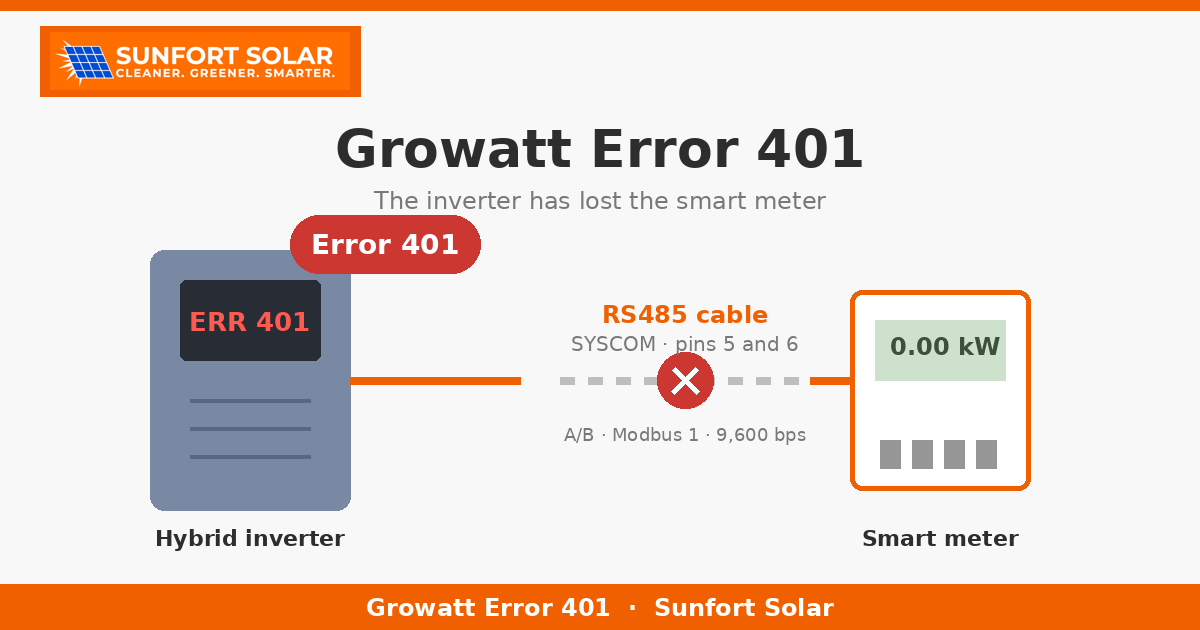
On Growatt MIN TL-XH inverters, error 401 stands for “Smart Meter Abnormal”: the inverter has lost communication with the smart meter.
The smart meter is a small device, usually mounted in the consumer unit, that measures the energy flowing into and out of the house. In the installations we see, the usual models are the Eastron SDM230 or the Chint DDSU666. The meter and the inverter talk to each other over a data cable, the RS485 bus. When that conversation is interrupted, the inverter reports it as error 401.
Don’t confuse this meter with the utility’s meter: it belongs to the solar installation, and the grid operator has nothing to do with it.
Why it matters
Without the meter, the inverter doesn’t know how much the house is consuming at any given moment. And that is exactly the figure it uses to decide what to do with the energy from the panels and the battery. So while the error lasts, it may no longer correctly manage:
- Self-consumption: it can’t match production to what you are using.
- The battery: it may not charge or discharge it when it should.
- Zero export: if your system is set up not to feed energy into the grid, the inverter may lose that reference.
It is not usually a serious or dangerous fault, but it does mean the system performs below what it should. It is worth not letting it slide.
The usual causes
In our experience, error 401 usually comes down to one of these causes:
A loose RS485 cable or a damaged pin. On the inverter, the meter cable goes into the communications connector (called SYSCOM), which has 8 pins. The meter is connected specifically to pins 5 and 6. These pins are not interchangeable with those of the other buses on the connector: if the cable has moved, a wire has worked loose or a pin is bent or broken, communication is lost.
A/B polarity reversed. The RS485 bus has two wires, A and B. If they are swapped, the inverter and the meter can’t understand each other.
The meter has no power. If the meter isn’t getting power (for example, because a circuit breaker in the consumer unit has tripped), it can’t respond.
The meter settings have changed. The inverter expects the meter to have specific settings: Modbus address 1, 9,600 bps and 8N1 format. If someone has changed the configuration, or the meter has been replaced with one set up differently, communication fails.
What you can safely try yourself
Before calling anyone, there are two checks you can do without any risk:
- Do a full restart of the inverter. Switch off the AC side and also the battery or DC side, following the order given in your equipment’s manual. Wait about a minute and switch it back on. It sounds too simple, but it often fixes it: if communication had simply hung, the inverter finds the meter again when it restarts.
- Check that the meter’s display is on. Find it in the consumer unit. If the display is off, it may not be getting power. In that case, don’t touch it: make a note and tell the technician.
And one important point: don’t open connectors or electrical panels. Taking apart the communications connector or handling the wiring is a job for a technician, both for your safety and to avoid damaging the equipment.
If the error disappears after the restart and doesn’t come back, that is probably it. If it reappears after a few hours or days, it is a sign that there is something physical that needs checking.
What the technician checks
When we go out, the check follows roughly this order:
- The cable and pins 5 and 6 on the SYSCOM connector: that the cable is firmly held and no pin is bent, broken or corroded.
- The RS485 bus voltage: measured with a multimeter, it should be around a stable 3.3 V. A voltage that fluctuates or is missing points to a problem in the wiring or the connection.
- The A/B polarity, to rule out crossed wires.
- The meter settings and Modbus address, compared with what the inverter expects.
- Remaking the connector, if needed, when the problem is physical.
It is usually a short job, but it takes the right tools and knowledge of the equipment.
Real cases
We have helped several customers in the Alt Empordà whose Growatt MIN TL-XH was showing error 401. The outcomes were different. In one case, a full restart of the inverter solved it and the error hasn’t come back. In another, the restart didn’t help: when we checked the connector we found a broken pin, and the connection had to be remade.
The lesson is that a restart is always the first step, but if the error comes back, the answer isn’t to restart every week: there is a physical cause to be found.
If your Growatt shows error 401
Start with a full restart and check that the meter’s display is on. If the error persists or comes back, ask for a check: the sooner it is fixed, the less energy you lose.
At Sunfort Solar we maintain Growatt inverters in the Alt Empordà, whether or not we installed the system. Get in touch, tell us what you see on the display and we’ll see how we can help.