New battery modules: why it stops at 70 % and how to fix it
New battery modules: why it stops at 70 % and how to fix it
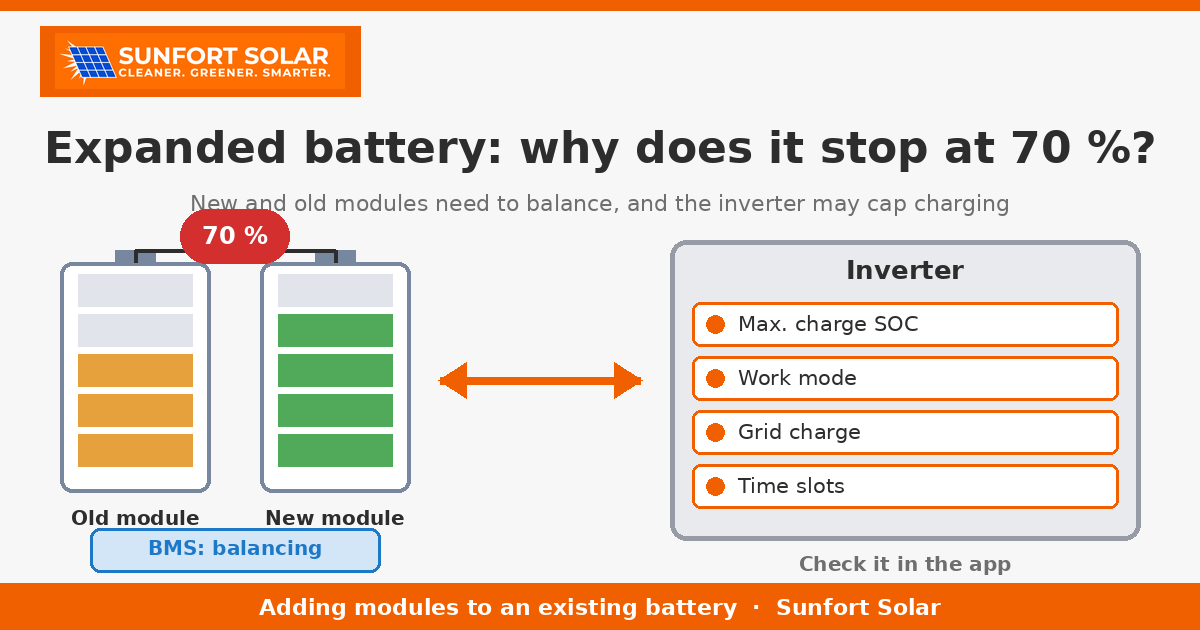
This week we have had several similar questions: “We added modules to our battery, and now it never goes past 70 % during the day. It used to reach 100 %. Is something broken?” In most cases, no. An expanded battery needs a few days for the new and old modules to fall into step, and quite often an inverter setting is stopping the charge early.
Here is why it happens, what you can check yourself in the app, and which signs mean there really is a fault.
New and old modules are not the same
A home lithium battery is made of modules, and each module has its own cells and its own battery management system (BMS). When you add new modules to a battery that is a few years old, you are combining parts that are not identical:
- Different state of health (SOH). A module that has been in use for a few years has lost part of its original capacity; the new one has all of it.
- Different state of charge (SOC). New modules usually leave the factory half charged, while the old ones may be nearly full or nearly empty on the day they are connected.
- Different capacity or generation. Sometimes the exact model is no longer made and its replacement has a slightly different capacity or internal design.
- Different firmware. The new module’s BMS may run newer firmware than the old ones.
Modules connected in parallel share the same voltage, and the system behaves like its most limiting module: as soon as the first one reaches its cell voltage limit, the BMS reduces or stops charging for the whole stack, even if the others are not full. That is why the percentage in your app can get stuck below 100 %.
Balancing: why it doesn’t reach 100 % in the first days
The BMS has two jobs that take time:
- Evening out the cells. Balancing in lithium iron phosphate (LFP) cells happens mainly when the battery is close to full, and it is slow. If the battery never reaches the top, it never balances.
- Recalibrating the percentage. SOC is an estimate: the BMS counts the energy going in and out and corrects itself when the battery reaches full. With new modules, the figure can be off until the system has done a few full cycles.
So it is normal for the SOC to stop at 70, 80 or 90 % in the first days, or even the first weeks, and creep up gradually. Many manufacturers recommend bringing the modules to a similar charge level before connecting them and doing a full charge right after installation, to shorten the process.
And a seasonal point: in November on the Costa Brava, the days are short. If your battery is now bigger but your panels are the same, there may simply not be enough sun to fill it. If the app shows that your panels have no surplus in the afternoon, 70 % is not a fault.
Cold plays a part too: if the battery sits in an unheated garage or storeroom, the BMS limits charging early in the morning until the cells warm up a little.
Inverter settings that cap charging
The other common cause is not the battery but the inverter. Each brand uses its own names, but the ideas are the same:
- Maximum charge SOC. Many inverters let you set the percentage the battery charges up to (for example Growatt’s “Charge Stop SOC” or Huawei’s end-of-charge SOC). If someone set it to 70 % or 80 %, the battery will stop there every day.
- Operating mode. In modes such as “Battery First” or “Load First” (Growatt), or the work modes of Deye and Huawei, the inverter decides whether surplus goes first to the battery, the house or the grid. A mode chosen for summer or for a particular tariff can leave the battery half full in winter.
- Charging from the grid (AC charge / grid charge). If it is enabled with a target SOC, the battery charges from the grid up to that level during set hours. If it is disabled, it only charges from the sun.
- Time slots. Deye and Growatt, for example, let you programme periods of the day with a target SOC for each. A badly configured slot can make the battery discharge or stop charging at the wrong time.
- Maximum charge current and configured capacity. After expanding the battery, check that the inverter has correctly read the number of modules from the BMS (in systems like Pylontech, the master module reports to the inverter) and, if the inverter works without BMS communication, that the capacity has been updated.
In a holiday home it is also common for someone to change a setting one summer (a technician, a tenant with the app, the owner) and for nobody to remember. Check this before assuming a fault.
What you can check in the app
Without opening anything or touching any cable, you can look at the following in your monitoring app:
- SOC over the day. If it rises and always stops at the same figure (70 %, 80 %…), that points to a setting. If it stops at a different point every day, it may be balancing or a lack of sun.
- Charging power when it stops. If the battery stops charging while the panels are exporting to the grid, something is capping the charge.
- The number of modules or capacity shown in the app. If it still shows the old capacity after the expansion, the new module may not have been detected.
- Alarms and warnings from the battery or BMS.
- The work mode and maximum SOC, if your app shows them.
Take a screenshot of each. If you need to call your installer, it may save a visit.
When it really is a fault
Call your installer if you see any of these:
- A module in error or missing, or a red or alarm light on any module.
- BMS alarms for cell overvoltage or undervoltage, temperature or communication, especially if they repeat.
- A large difference between cells (if the app shows it) that does not shrink after several days of full charges.
- Sudden SOC jumps, for example from 70 % to 100 % within minutes, or the house losing power with the battery supposedly at 50 %.
- A smell, unusual heat or noises from the battery. In that case, do not touch it and call straight away.
Never open the modules or disconnect cables yourself: a home battery can deliver very high currents even when it is switched off.
Practical tip: expand it right from the start
If you plan to add modules to an existing battery:
- The same model and, where possible, the same batch as the ones you have. The closer they match, the fewer balancing problems.
- Check compatibility. The inverter manufacturer publishes a list of compatible batteries, and the battery manufacturer states which models can be combined. If the new model is not listed, don’t do it.
- Up-to-date firmware on all modules and on the inverter, checked by the installer.
- Equalise the charge before connecting and do a full charge afterwards, following the manufacturer’s instructions.
- Don’t expect miracles in winter: if you expand the battery in October or November, you may not see it full until spring if your panels are on the small side.
Expanding a battery that is many years old also has its limits: if the old modules have already lost a lot of capacity, replacing the whole battery is sometimes the better option. We cover this in our article on adding a battery to an existing solar installation.
At Sunfort Solar we install and expand batteries in the Alt Empordà and check the inverter configuration after every expansion. If your battery seems stuck, get in touch and send us screenshots from the app: we will tell you whether it is a setting, balancing, or something that needs a visit.